Upscale
Use the Upscale section to change the number of pixels in your image.
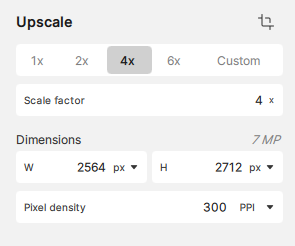
There are two methods to resize your image:
- SCALE FACTOR will upscale your image by a multiplier of up to 6x
- DIMENSIONS will upscale your image by using a custom width or height
The degree of denoising, sharpening, and fixing compression that is applied depends on the change in pixels. For dedicated Denoise and Sharpen tools, look to Topaz Photo.
Maximum Dimensions
32,000px on the longest side is the maximum dimension for upscaling, with the largest image possible being 32,000×32,000 pixels (~1 Gigapixel).
Custom
- Click "Custom" as the multiplier
- In the "Scale factor" field, type in your multiplier
- Press Enter
The dimensions of your image automatically adjust after you set the scale. Custom scales can be specified by up to 2 decimal points.
The default Pixel density is 300. This can be set in your preferences.
Use the 1x scale to enhance your image without upscaling.
Downscaling
Custom scale factors below 1x (0.9-0.2x) can be used to downscale images to prepare for web or to help eliminate false resolution.
Pixel Density
Pixel density, or resolution, is usually measured in PPI, or pixels per inch. DPI refers to printer output in dots per inch. The right pixel density, or resolution, depends on viewing distance: the farther away the image will be seen, the less pixel density is needed.
Because the eye sees less detail from farther away, the intended viewing distance helps determine how high the pixel density needs to be.
If you're unsure what pixel density to set for physical media, use these examples below as a guide:
- Near viewing, at arms length: 300PPI
a magazine or poster - Distant viewing, across the room: 240-120PPI
a mural or wallpaper - Far viewing, across the street: 90-30PPI
a sign or billboard
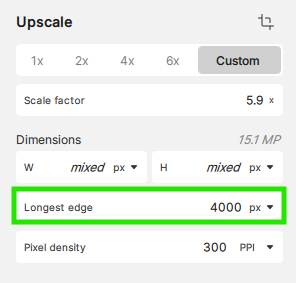
Longest Edge
Image batches can be scaled by the longest side:
- Select multiple images, the Dimensions show mixed indicating that there are multiple values across all images.
- Under Longest edge, type in the value you want to apply to all images.
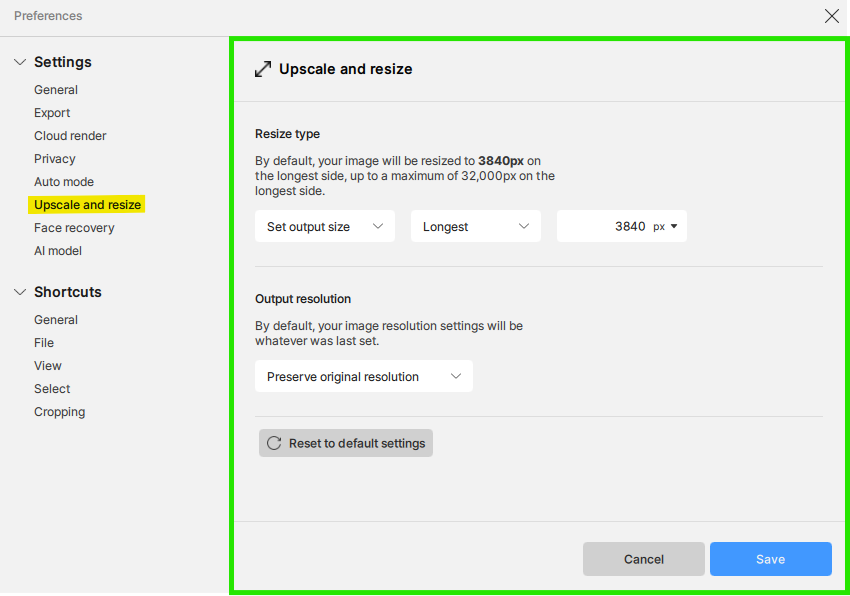
Setting a Default Output Size
This is useful for Batch processing.
From the menus go to Preferences and select "Upscale and resize"
In Resize type, change the drop down boxes to Set output type.
Select your type (Scale, Width, Height, Longest), then choose a value.
You also have the option to define a default pixel density.