JPEG to RAW & Adjust AI
JPEG to RAW
Status
- Last compatible macOS: Ventura
JPEG to RAW is no longer maintained and may fail to install, launch, or process files on newer versions of macOS or on newer hardware.
Replacement Availability
At this time, there is no direct replacement application for JPEG to RAW.
Because the application is discontinued and no longer updated, we are unable to provide fixes or workarounds for compatibility issues on newer systems.
Adjust AI
Status
- Discontinued
- macOS compatibility: macOS 10.15 (Catalina) and earlier
Adjust AI does not receive updates and is not compatible with newer versions of macOS, Windows, or current Adobe applications.
Replacement Option: Topaz Studio 2
While Adjust AI itself is no longer supported, many of its visual effects can be recreated manually using filters in Topaz Studio 2.
This is not a one-click replacement, but similar results can be achieved by combining filters.
Here are the Studio 2 filters that cover similar functionality:
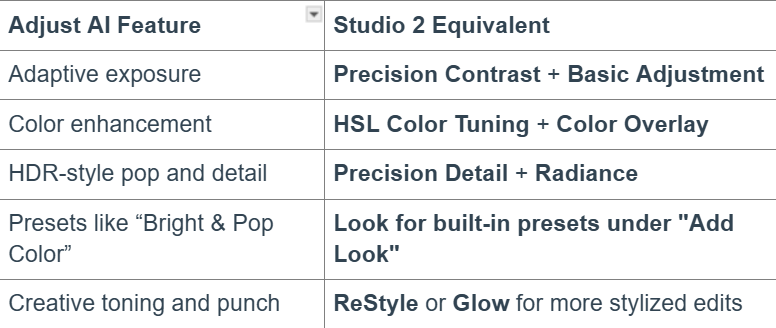
- Open your image in Studio 2
- Click “Filter” on the right panel and under Essential you'll find:Precision Detail
- Precision Contrast
- HSL Color Tuning
- Basic Adjustment
- ReStyle
When to Stop:
The application does not install or launch
- Your system is newer than the compatibility listed above
- You are attempting to use these apps on modern operating systems
No further troubleshooting is available for JPEG to RAW or Adjust AI.
We recommend using currently supported Topaz products for continued compatibility and support.